best systems · DIGIUP SMART
Update your content - right from your smartphone
Upload images, videos and PDFs - with no ongoing licence fees.
How often does your content change?
Update whenever you need to
Digital content only stays up to date if updating it is quick. As soon as you need a laptop, a USB stick or extra software to do it, last week’s content keeps playing on the display.
That’s exactly where DIGIUP SMART comes in: connect your smartphone to the display, upload images, videos or PDFs straight from your gallery or cloud, then set the order and display duration. All in your browser - no app download required.
Step by step
DIGIUP smart explainer video
The complete setup in one video - from the first connection to a display that’s up and running.
How it works
Set up in five steps
1 Connect the display
Plug the power cable into the display. For the initial setup, you’ll also need to connect a mouse via USB.
2 Connect to your network
Open the Wi-Fi settings on the display, select your network and enter the password. Without a network connection, you won’t be able to access the web interface.
3 Connect your smartphone
Scan the QR code on the display and the media manager opens in your browser. Log in with the default password, then set your own.
4 Upload your media
Select images, videos and PDFs straight from your gallery or cloud - several at once, if you like. Change the order with drag and drop.
5 Adjust the settings
Set the display duration, transitions, zoom, fill mode and volume for all files at once - or individually for each file.
Content Management
Two ways to manage your content
Manage and play your content via DIGIUP SMART or USB – depending on your application and requirements.
|
DIGIUP USB |
Simple, secure playback from a USB stick |
|
DIGIUP SMART |
Upload and control your content from your smartphone |
The DIGIUP collection
Two ways to manage your content
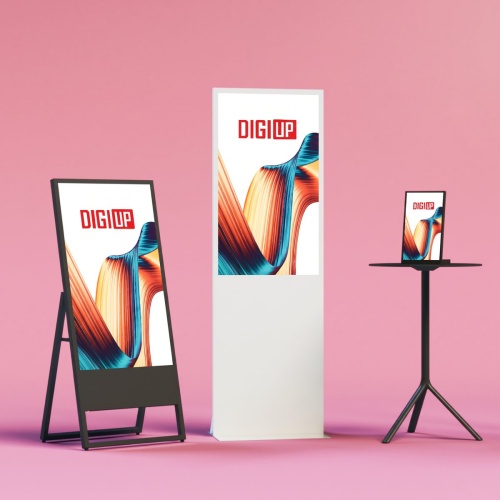
Whether you need an A-frame display, a desk solution or a freestanding unit - the DIGIUP collection offers the right digital display for every application.
All models work with DIGIUP SMART.
WARNING: By using the website, the user agrees to comply with all the provisions in the following general terms of use for the content of the website best-systems.com.
By visiting the website or subscribing to the newsletter, the user agrees to the general terms of use. If the user does not agree with the general terms of use, the use of the website or subscription to e-newsletters and filling out forms on the site is not possible.
General Provisions
The general terms of use (hereinafter: terms of use) of the website best-systems.com (hereinafter: website) relate to the terms of use of the content on the website. They represent a legally valid and binding agreement between Best Systems GmbH, Siebenhirtenstraße 12A Object 5, 1230 Vienna (hereinafter: provider), and each person who visits the website and/or uses the website in any way (hereinafter: user).
The provider reserves the right to change and/or delete any part of the websites without prior notice. With the aim of providing the user with the best possible experience, the provider ensures continuous updating of the website. The user is aware and agrees that the format and nature of the website may change occasionally without prior notice to the user.
Website Accessibility
The websites are generally accessible 24 hours a day. The provider reserves the right to temporarily interrupt access to the websites for technical reasons. The provider also reserves the right to longer interruptions of access to websites in cases related to maintenance work and/or equipment replacement. The provider does not guarantee access to the websites in cases of outages in internet connection provider networks or any outages, errors, and/or other technical disruptions or interruptions resulting from the non-functioning of third parties (internet connection outage, power outage, etc.) and in cases of force majeure.
Limitations of Access to Websites
The provider reserves the right, in case of suspected abuse as stated in point 7 of these terms of use, to restrict or terminate access to website content for an individual user's IP address.
Age Restrictions and Liability
There are no age restrictions for using the websites. The use of websites is intended for personal use by the user. Registering other persons or filling out forms for other persons is not allowed, for which the user guarantees with full indemnity liability and assumes passive legitimation in case of disputes.
To view more details about privacy policy and cookies policy, please visit the following links:
Privacy policy
Personal data protection policy
Disclaimer
The user acknowledges that:
Without prior permission from the provider, it is prohibited to: copy, print, or store published images on websites. Similarly, without prior permission from the provider, the use of graphical elements and trademarks is expressly prohibited.
Use of AI-Generated Content
The Provider uses images, graphics, renderings, and visualizations on this website that may be created or enhanced with the assistance of artificial intelligence (AI). These materials are intended solely for the illustration, presentation, and marketing of the Provider's products and services.
Unless explicitly stated otherwise, AI-generated visualizations do not constitute a binding representation of actual products, projects, or installations. The specifications, features, scope of delivery, and performance of the products offered are governed exclusively by the respective product descriptions, technical data sheets, and individual quotations provided by the Provider.
The user agrees:
Complaints
In case of issues or questions, you can send a message to [email protected].
Violation of Terms of Use
The provider reserves the right to disable access to websites for users who violate terms of use or general business terms. If a user causes any damage to the provider through their actions, they are fully morally, materially, and criminally liable. Any violations of business terms and/or general business terms by other users can be reported to [email protected].
Changes and Amendments to General Terms of Use
The provider may change and/or amend these terms of use due to changes in regulations governing website operations, data protection, and other areas related to the provider's website operations and changes in their own business policy. Users will be informed about these changes through suitable means every time they occur, especially through notifications on the website https://www.best-systems.com or via email, especially if changes concern changes in personal data protection policy. Each change and/or amendment to terms of use will come into effect with an eight-day period after publication. If changes and/or amendments to business terms are necessary for compliance with regulations, these changes may exceptionally come into effect in a shorter period.
Users who do not agree with changes and/or amendments to these terms of use must cancel their registration within eight days of notification about changes and/or amendments to terms of use or stop using services, content, or anything else from websites; otherwise, after this period expires, it will be considered that the user accepts changes and/or amendments to terms of use. Registration cancellation is done by sending a written statement to the provider. Ceasing use is considered when a user no longer uses the provider's websites in any way.
The general business terms were adopted by the provider's director in Vienna on January 22nd, 2025.